小苹果园

标题: iStat Menus for Mac 5.20 注册版 - Mac上最优秀的系统监控工具 [打印本页]

作者: jingjing    时间: 2019-7-27 18:07
标题: iStat Menus for Mac 5.20 注册版 - Mac上最优秀的系统监控工具
摘要:iStat Menus是 Mac 上最优秀的系统监控工具,能够在系统菜单栏实时监控CPU、GPU、内存、硬盘、网络、温度、电池以及系统时间等,稳定且占用资源少,可以说是装机必备的软件
iStat Menus是 Mac 上最优秀的系统监控工具,能够在系统菜单栏实时监控CPU、GPU、内存、硬盘、网络、温度、电池以及系统时间等,稳定且占用资源少,可以说是装机必备的软件。
[iStat Menus 5 在官网上售价16美元,约合人民币100元]
iStat Menus for Mac 5.20 介绍iStat Menus iStat Pro需要存在于Dashboard,这是一款一款常驻菜单栏右侧的小工具,我们可以时刻了解自己 Mac 电脑上发生各种情况,比如查看硬件温度,查看即时网速以及查看内存和硬盘使用率等。iStat Menus 的开发非常不容易,开发者曾经在博客上提到因为每次新款 Mac 电脑传感器都不同,所以需要购买机器进行测试。苹果下一代桌面OS X Yosemite 将于今年秋天发布,新系统采用全新界面设计,大量使用扁平、透明的元素。
iStat Menus lets you monitor your system right from the menubar. Included are 8 menu extras that let you monitor every aspect of your system.
Some features:
  • CPU -- Monitor cpu usage. 7 display modes, multiple core support.
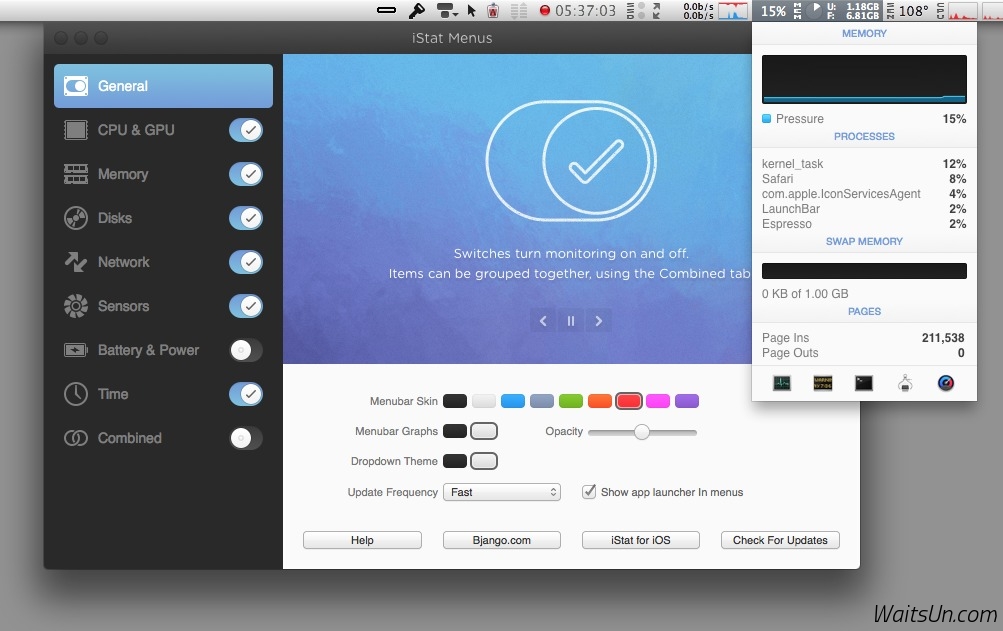
  • Memory -- Monitor memory usage. 4 display modes, page ins/outs and swap usage display.
  • Disks -- Monitor disk usage and activity. 6 display modes, ability to hide disks you dont want to see.
  • Network -- Monitor current and total bandwidth, peak bandwidth, IP addresses, and the ability to hide network connections you don't want to see.
  • Temps -- Monitor the temperature of your Mac. 2 display modes, ability to hide sensors you don't want to see.
  • Fans -- Monitor the fan speeds in your Mac. 2 display modes, ability to hide sensors you don't want to see.
  • Bluetooth -- Control bluetooth status plus monitor the battery level of your Apple wireless keyboard or mouse.
  • Date & Time -- Date and time in your menubar. World clock display lets you see the time in multiple locations around the world.

    iStat Menus for Mac 5.20 下载 [pan=https://pan.baidu.com/s/1xUyVYDUo5EohepHTFp0DGw]菁菁社区||30[/pan]         菁菁苹果园 bbs.lingsky.com


    欢迎光临 小苹果园 (http://bbs.lingsky.com/) Powered by Discuz! X3.4