标题: 2Do 2 for Mac 2.3.1 激活版 - 优秀的待办事项管理GTD工具 [打印本页] 作者: jingjing 时间: 2019-7-27 18:11 标题: 2Do 2 for Mac 2.3.1 激活版 - 优秀的待办事项管理GTD工具 摘要:2Do for Mac让你用一个全新的方式来管理您的任务。凭借其极其简单易用的界面和全面的,灵活的强大的功能,它可以让你专注于你的生活, 2DO更注重你个人的管理想法,当你开始使用2Do for Mac时,做好准备被惊艳到吧!
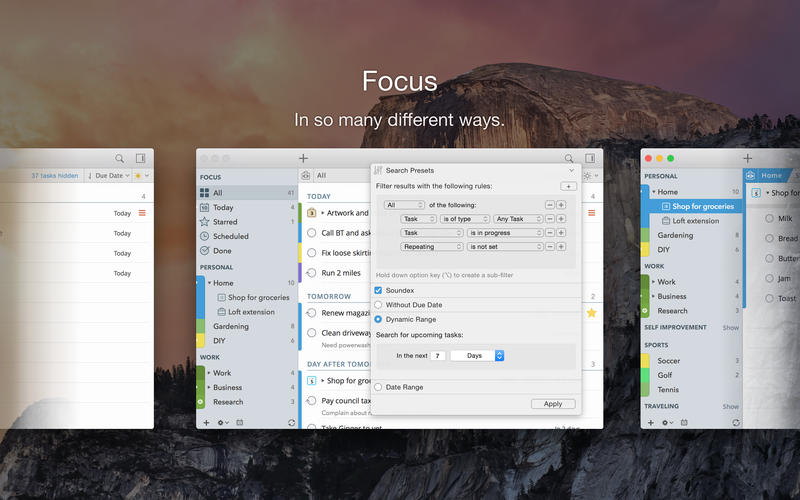
2Do for Mac让你用一个全新的方式来管理您的任务。凭借其极其简单易用的界面和全面的,灵活的强大的功能,它可以让你专注于你的生活。使用2Do for Mac是绝对赞的,它不像其他的待办事项应用程序,它不会强迫你使用特定的任务管理方法。 2DO更注重你个人的管理想法,当你开始使用2Do for Mac时,做好准备被惊艳到吧!
[2Do 2 在 Mac App Store上售价人民币328元]
2Do 2 for Mac 2.3.1 介绍简单的任务,清单及项目
2Do lets you take a completely different approach to managing your tasks. With its extremely simple-to-use interface and a comprehensive and flexible set of powerful features, it lets you focus on what's most important to you: your life. There is no wrong way of using 2Do, and unlike other to-do apps, it won't force you to adhere to a particular task-management methodology.
v2.3.1版本新功能What's new in v2.3.1:
[NEW]:
When batch deferring or scheduling tasks, in addition to picking a date, you can now 'Postpone' them instead using an interval such as 1 day, 10 days, 2 weeks, 3 months and so on.
[FIXES]
Fixes a bug where the app may crash when batch tagging
Fixed other stability improvements
v2.3版本新功能Version 2.3:
New:
Touch Bar support for the new Macbook Pro
Use Touch ID with the new Macbook Pro to unlock your protected lists
When using the Notification center alert method, you can now complete tasks directly from alerts
Optionally, auto-fill quick entry notes with text from the clipboard
Option to set the Return key as a way of creating new tasks from Settings > Advanced
Several New Keyboard Shortcuts To Speed Things Up:
Use 'X' on selected tasks to batch edit durations
Use 'L' on selected tasks to append new tags
Use 'CMD+O' to quickly toggle between showing completed tasks (based on your existing preference) and hiding them
- Use 'F' to quickly find and highlight a task within the list
- Use '/' to quickly enter Tag filter mode and type in the name of the tag to filter on
- Use 'E' to batch set due time / start times to task. If you've enabled auto-alerts at due times, this now enables you to quickly create alerts for multiple tasks at the same time.
- New shortcut for toggling Search Scope (Edit Menu > Find)
Durations can now be set upto 90 minutes/hours/days/weeks instead of 60
Keyboard shortcut added to toggle Search Scope
When deferring / scheduling tasks, bottom shortcut buttons can now be accessed by keyboard shortcuts
When using the Jump Bar (Keyboard shortcut: J) to switch between lists, 2Do now auto-collapses previously collapsed lists and groups
Hitting Return after pressing 'D' to defer tasks now auto-selects the selected date
When editing or creating locations, right-click to drop pin to the new location
Right click on a List Group to colorize all contained lists in one go
Fixed a bug where using durations with due dates would cause the task to appear as overdue at times
Several bug fixes and general performance improvements
2Do 2 for Mac 2.3.1 下载 高速下载 [pan=https://pan.baidu.com/s/1xUyVYDUo5EohepHTFp0DGw]菁菁社区||30[/pan] 菁菁苹果园 bbs.lingsky.com