标题: GraphicConverter 10 for Mac 10.4.2 序号版 - Mac上强大的图片编辑浏览工具 [打印本页] 作者: jingjing 时间: 2019-7-27 18:14 标题: GraphicConverter 10 for Mac 10.4.2 序号版 - Mac上强大的图片编辑浏览工具 摘要:GraphicConverter是一款Mac上的多功能图片处理工具,除了支持激活所有的图片格式的批量转换外,还支持类似ACDSee的图片浏览界面,并且具有强大易用的图片编辑、元数据编辑、美轮美奂幻灯片显示功能等等,具备了其他多款软件才具有的功能,非常的强大。
GraphicConverter是一款Mac上的多功能图片处理工具,除了支持激活所有的图片格式的批量转换外,还支持类似ACDSee的图片浏览界面,并且具有强大易用的图片编辑、元数据编辑、美轮美奂幻灯片显示功能等等,具备了其他多款软件才具有的功能,非常的强大。
[GraphicConverter 10 在 Mac App Store上售价39.99美元,约合人民币 240元]
GraphicConverter 10 for Mac 10.4.2 介绍GraphicConverter 10 is the universal tool for browsing, enhancing and converting images. Simply drag a folder onto GraphicConverter 10 to view your pictures.
The slide show for viewing and sorting images is a big hit among users. Use standard tools to edit images or display the most important controls in the window.
Professional users love GraphicConverter 10 because of it’s wide range of functions for handling meta data like EXIF, IPTC, XMP and GPS. Want to copy the filename into the IPTC description? GraphicConverter 10 will take care of this for you.
You can open over 200 graphic file types and save images in over 80 formats. A simple multiple conversion mode takes care of batch runs. Want to use a batch function to alter the image size or change the color mode to CMYK? Dozens of batch functions are available.
GraphicConverter 10 has everything you would expect from a versatile image processing application for your Mac. Simple usage and far-reaching options await you along with stability and reliability.
In the press, GraphicConverter has been described as a “Swiss Army knife” and as an “all-round wizard for image editing on Macs”. We could not describe it better.
New features of version 10:
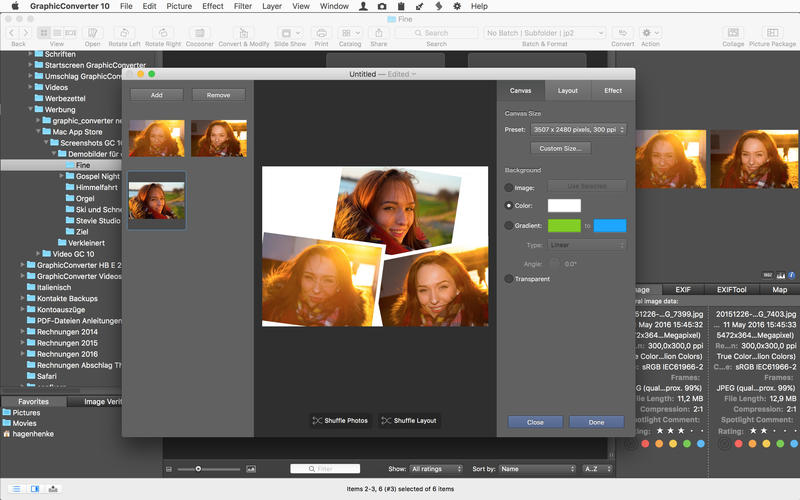
Collage
Would you like to put together a collage of the best photos from your vacation? No problem with the new Collage function. Select the image files in the Browser and open the Collage window where you will find basic layout functions. It is so easy to use that even your children could do it. That’s a promise.
Face Recognition
You will notice how useful Face Recognition is, for example, when you want to print your best family photos for an annual album. Simply enter the names of people you want to add. GraphicConverter does everything else for you and will display the pictures in the Browser. You want to add your children’s best friends too? Simply enter their names and the job is almost done.
Picture Package
We all know the situation. You want to print several copies of a portrait or a passport photo on one sheet of paper. This is very easy now thanks to the new Picture Package function. Select the picture, open Picture Package and off you go. It is childishly simple and versatile. Also, it allows you to use valuable photo paper in an ideal way.
And much more…
v10.4.2版本新功能Version 10.4.2:
New
Prefs:open:formats:pcd option to assign automatically sRGB profile
Convert and modify:split MPOs into JPGs…
Convert and modify:transfer GPS records (from source to destination folder onto identical named files)
Browser context menu:set exif time zone command
Browser context menu:set exif date - added time zone support
Convert and modify:scale (short edge) batch
Import: dxf
Import: dwg
Selection: added autosave option and store menu item
Image toolbar: added icons for auto enhancement and auto xe8472
Prefs open movies: option to disable usage of QuickTime modernizer