小苹果园
标题:
GraphicConverter 10 for Mac 10.6.1 破解版 - Mac上强大的图片编辑浏览工具
[打印本页]
作者:
jingjing
时间:
2019-7-27 18:26
标题:
GraphicConverter 10 for Mac 10.6.1 破解版 - Mac上强大的图片编辑浏览工具
摘要:GraphicConverter是一款Mac上的多功能图片处理工具,除了支持激活所有的图片格式的批量转换外,还支持类似ACDSee的图片浏览界面,并且具有强大易用的图片编辑、元数据编辑、美轮美奂幻灯片显示功能等等,具备了其他多款软件才具有的功能,非常的强大。
GraphicConverter是一款Mac上的多功能图片处理工具,除了支持激活所有的图片格式的批量转换外,还支持类似ACDSee的图片浏览界面,并且具有强大易用的图片编辑、元数据编辑、美轮美奂幻灯片显示功能等等,具备了其他多款软件才具有的功能,非常的强大。
[GraphicConverter 10 在 Mac App Store上售价39.99美元,约合人民币 240元]
GraphicConverter 10 for Mac 10.6.1 介绍GraphicConverter 10是浏览的通用工具,增强和图像转换。简单地将一个文件夹上graphicconverter 10查看你的照片。
观看和整理图片的幻灯片在用户中大受欢迎。使用标准工具编辑图像或显示窗口中最重要的控件。
专业的用户喜欢GraphicConverter 10因为它的功能广泛用于处理元数据如EXIF,IPTC,XMP和GPS。要复制的文件名为IPTC描述吗?GraphicConverter 10会为你照顾这。
可以打开超过200个图形文件类型,并保存超过80种格式的图像。一个简单的多种转换方式照顾批处理运行。要使用批处理功能来改变图像尺寸或改变颜色模式为CMYK?可以使用几十个批处理函数。
GraphicConverter 10有所有你期望从一个通用的Mac图像处理中的应用。简单的使用和深远的选择等着你的稳定性和可靠性。
在新闻界,GraphicConverter被称为“瑞士军刀”和一个“全面”向导的图像编辑在苹果电脑”。我们无法更好地描述它。
版本10的新特性:
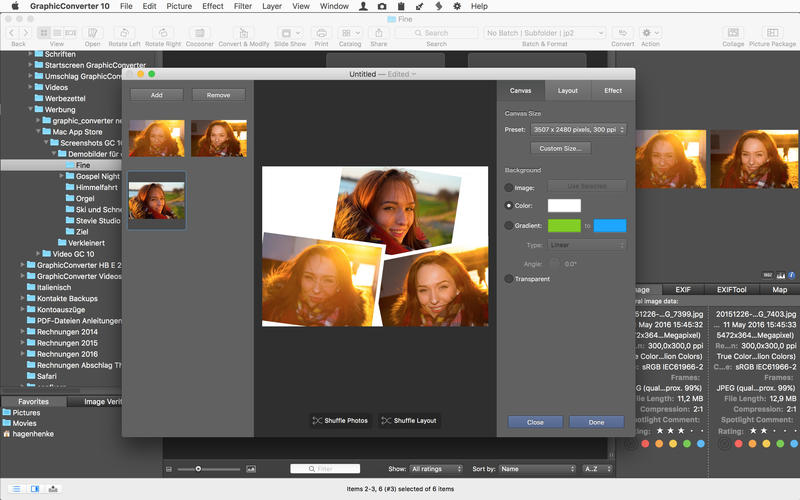
拼贴
你想拼一拼你度假时最好的照片吗?新的拼贴功能没有问题。选择浏览器中的图像文件,打开拼贴窗口,在那里你可以找到基本的布局函数。这是很容易使用的,甚至你的孩子能做到。这是一个承诺。
人脸识别
例如,当你想为年度相册打印最好的家庭照片时,你会注意到面部识别有多么有用。只需输入你想添加的人的名字。GraphicConverter做一切你将在浏览器中显示的图片。你想把你的孩子的最好的朋友吗?只需输入自己的名字,就差不多了。
图片包
我们都知道情况。你想在一张纸上印几张肖像或护照照片。由于新的图片包功能,现在这非常简单。选择图片,打开图片包,去你的吧。这是幼稚、简单和灵活的。此外,它允许你在一个理想的方式使用宝贵的照片纸。
而且更多…
v10.6.1版本新功能Version 10.6.1:
Browser : Added a Edit Names command in the toolbar that allows you to change the file name or the IPTC / XMP title of the file.
Convert & Edit : Added a Save action to create complex batch actions that allow multiple records.
Convert & Edit : Adding a useful Reload action to reuse the source image after a Save action.
Convert & Edit : Adding an action Create a subfolder.
Convert & Edit : Adding an Anonymize Faces action.
Context menu> Browser : Add a menu item to edit tags directly.
Effects menu : Adding a gradient filter.
Browser and Edit window : Added an icon for hiding the toolbar (from macOS 10.10).
Preferences: Convert> General : Adding settings for automatic conversion.
GPS : Added GPS data detection in RW2 files.
Locations : Update translations.
Convert & Modify : Added the "Option" button in the Change format instruction.
Coordinates window : Adding the length and angle made to the horizontal when drawing a line.
Save - Resources Preferences : Added option for icon size.
Browser : Light access to files that do not have a GPS position to optimize the display time of thumbnails.
Edit Mode : Added a "Print" icon in the toolbar of the edited image.
APN Import : Added a preset folder option.
Multi-core : Improved support for batch conversions.
Batch Processing : Added support for multiple images of ithmb files.
Image> Dimensions> Edit margins : Add a "Use for all" and "Re-use the latest values" button.
GraphicConverter 10 for Mac 10.6.1 下载
高速下载
[pan=https://pan.baidu.com/s/1xUyVYDUo5EohepHTFp0DGw]菁菁社区||30[/pan] 菁菁苹果园 bbs.lingsky.com
欢迎光临 小苹果园 (http://bbs.lingsky.com/)
Powered by Discuz! X3.4