摘要:Paintstorm Studio是为专业的数码绘画而创作的。这个程序中的一个主要角色是画笔。我们尽了最大的努力,这样你就可以轻松快速地调整画笔,适合你的绘画风格。
Paintstorm Studio是为专业的数码绘画而创作的。这个程序中的一个主要角色是画笔。我们尽了最大的努力,这样你就可以轻松快速地调整画笔,适合你的绘画风格。
[Paintstorm Studio在Mac App Store上售价人民币19元]
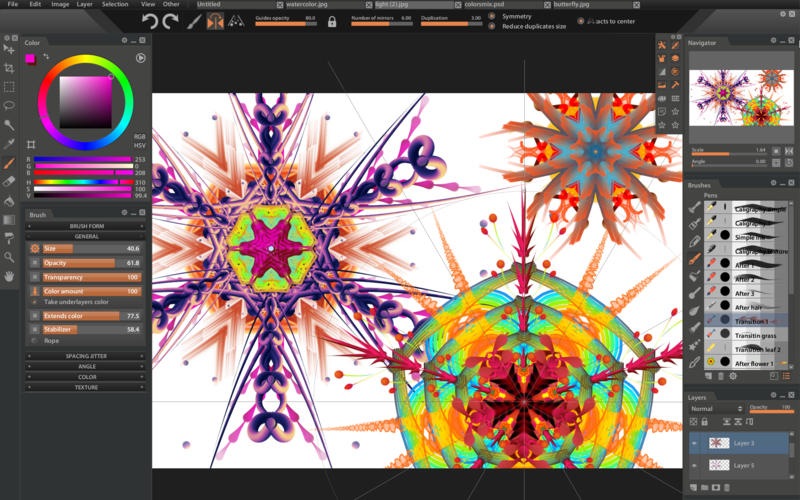
Paintstorm Studio for Mac 2.03 介绍Paintstorm Studio is created for professional digital painting. And a major role in this program play the brushes. We did our best so that you can easily and quickly adjust the brushes suitable for your painting style.
Anyone who has ever painted knows it's hard to overestimate the painting tool and the importance of all the seemingly insignificant details. We tried not to miss any of them. Our goal was to create an intuitive, simple-to-use but at the same time functionally powerful tool that brings the process of digital painting to a new level, making it as comfortable as possible.
Features
Full control of all brush options (Incredible possibilities for brush settings)
Bristle brushes of any form and kind
Stroke post correction (You can take an action on any option. Not only on the stroke thickness)
Full controlled mask-brush (Each brush can work as mask for other brush)
Takes underlayer's color while blending
"Close gaps" function when you fill or select
Individual hotkeys for any brushes
Fast layer selection
Smooth zoom and brush resize
Dirty brush mode
Stroke stabilizer
Usable color mixer
Different gradient strokes
Mirror drawing
Standart tools pack (Lasso, Magic wand, Crop, Fill, Gradient and etc)
Control of the random amounts
Photoshop PSD and ABR supported
Tablets supported
v2.03版本新功能Version 2.03:
Added features: Duplicate folder, Ungroup folder, Merge folder, Group layers to the folder
Using "Guides" And "Rulers" has become much more convenient: Paintstorm now keeps the position of the guides after each move. Click two times holding Shift to install the ruler to the desired direction quickly. For the 2-point and 3-point perspective there is an additional manual direction determination mode.
A new "Color Library" panel added. Colors can now be broken down into categories (folders), renamed, saved and uploaded. You can also import color sets from Photoshop. You can enable the new panel by: Menu-> View-> Color Library
A lot of new hotkeys added: Panels toggle, Rulers hotkeys, etc.
"Show recent colors" option added to the "Color" panel
You can now save and load your own custom presets of documents size in the "File-> New" panel
The layer mask can now be dragged from one layer to another one
Some minor bugs fixed
Paintstorm Studio for Mac 2.03 下载 高速下载 客服微信coolgps QQ41360481




 请点击此处下载