摘要:Default Folder X 是一款Mac上非常实用的菜单栏快速访问工具,能够自动记忆用户最近打开的目录,在菜单栏可以快速访问,此外,还支持用户自定义添加目录,支持多级目录的显示和快捷键的调用,非常的方便!
Default Folder X 是一款Mac上非常实用的菜单栏快速访问工具,能够自动记忆用户最近打开的目录,在菜单栏可以快速访问,此外,还支持用户自定义添加目录,支持多级目录的显示和快捷键的调用,非常的方便!
[Default Folder X 在官网上售价34.95美元,约合人民币180元]
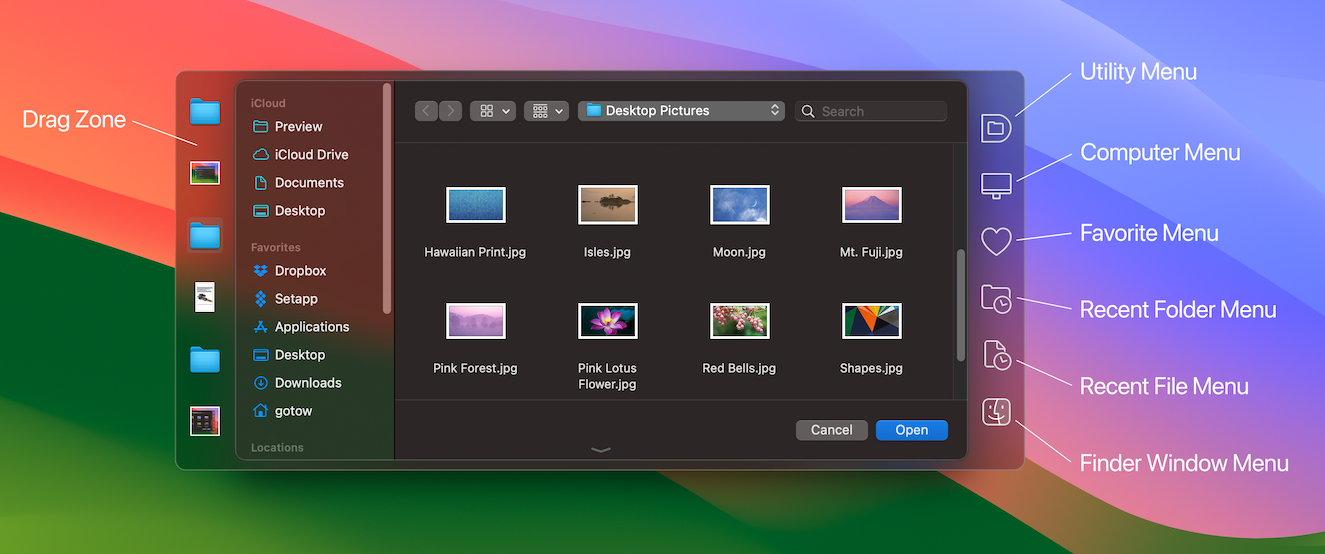
Default Folder X for Mac 5.1.9 介绍Default Folder X 将一个工具栏连接到打开的右边,并在任何OS X-本机应用程序中保存对话框。工具栏提供了快速访问各种文件夹和命令的功能。你只需点击按钮就可以进入你最喜欢的和最近使用的文件夹,管理列表中显示的文件夹和文件,并对你的设置做出改变。它还在打开和保存对话框中修复了许多问题,“反弹”到最后选中的文件,将路径列表放回到顶部菜单中,并在滚动的列视图中纠正错误。
Features
Directory assistant: You can access the contents of your recent, favorite, and open folders right from Default Folder X's toolbar.
Real time saving: If you're constantly saving things inside the same folder, Default Folder X can remember that folder for you.
Finder management: Default Folder X lets you open up or save to any Finder window with a single click.
Instant Recall: To help you quickly return to folders you've recently used, Default Folder X remembers them for you.
Spotlight on the spot: Default Folder X lets you add Spotlight keywords, OpenMeta tags, and Finder labels on the spot, while you're still in the Save dialog.
Information central: With Default Folder X you get previews below every Open dialog, expanded to fill the available space. Need to see more detail? Click on the image and it zooms up to full size.
Workflow without work: Rather than make you learn and set up a new application, Default Folder X blends into OS X.
v5.1.9版本新功能Version 5.1.9:
New
Added a new "Recently Closed" submenu to the Finder Windows menu so you can easily re-open recently closed Finder windows
When the Hide Extension checkbox is turned on in a Save dialog, Default Folder X will ensure that the resulting file has its extension hidden in applications that don't properly support extension hiding (like Google Chrome).
Added better workarounds for a bug in High Sierra that prevents Default Folder X from knowing which item is selected in a file dialog
Added an option (available with a Terminal command) to make Default Folder X use color icons in its toolbar; enter this command in Terminal: "defaults write com.stclairsoft.DefaultFolderX5 colorToolbar 1"
Fixed
The green gumdrop on the preferences window is now enabled or disabled correctly depending on whether the current preference tab is resizable.
Desktop and Documents folders on iCloud could sometimes confuse Default Folder X; it now correctly handles them.
Fixed a potential crash that could occur when Default Folder X relaunched the Finder
Fixed a bug that could cause Default Folder X to crash at random times
Default Folder X for Mac 5.1.9 下载 高速下载 客服微信coolgps QQ41360481



 请点击此处下载