摘要:WiFi Scanner是一款Mac平台的Wifi无线网络扫描管理软件,可以查找正在广播 SSID 的接入点和客户端。它可以用于WiFi现场调查,WiFi 的发现,并连接到的无线网络。该工具可以配合BSSID/MAC地址显示以dBm为单位的信号强度。
WiFi Scanner是一款Mac平台的Wifi无线网络扫描管理软件,可以查找正在广播 SSID 的接入点和客户端。它可以用于WiFi现场调查,WiFi 的发现,并连接到的无线网络。该工具可以配合BSSID/MAC地址显示以dBm为单位的信号强度。
[WiFi Scanner 在 Mac App Store上售价98元]
WiFi Scanner for Mac 2.7.7 介绍Using WiFi Scanner you’ll see nearby wireless access points and their details, including channels, signal levels (RSSI), noise, channel width, and MAC address, signal quality, maximum data rate, encryption, and much more. Also includes upload and download speed testing to quickly measure and analyze WiFi Internet performance problems.
“…your wireless router is fighting for spectrum with its neighbors, potentially slowing you down and making your Internet experience less pleasurable. ...WiFi Scanner helps you solve this problem by showing you all the access point(s) nearby, and suggesting the best configuration settings to get the most out of your router.” -- MacWorld
Simple, fast wireless network discovery of 802.11 a/b/g/n/ac access points. WiFi Scanner is great for determining the best position for an access point at home or in the office. After selecting the best position, the optimal channel to use can be determined by selecting the least used channel resulting in improved WiFi speeds.
Key Features
Simple, fast wireless network discovery of 802.11 a/b/g/n/ac access points.
Connect to detected networks using join button
Full support for both 2.4 and 5 GHz networks
Support for all channel bandwidths (20, 40, 80, and 160 MHz)
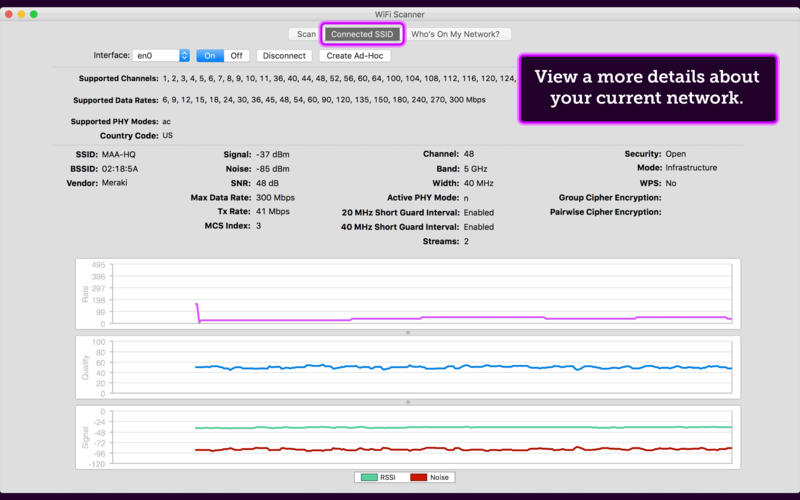
Display detailed wireless network parameters: network name (SSID), signal level (RSSI), MAC address (BSSID), signal quality, channel, maximum data rate, encryption, etc.
Display changes in signal level over time in graphical form.
Filter list of detected wireless networks by specified parameters (SSID/network name, channel, channel band, signal strength)
Display wireless connection statistics in the form of graphs and tables.
Give each access point a custom label
Export results to comma separated value (CSV) files
Generate summary reports in HTML format
WiFi Speed Testing
Upload and download WiFi speed testing
Use speed testing feature to troubleshoot WiFi networks
Auto run speed test when client roams to different access point
Auto repeat speed test with wait time between tests
"Who's On My Network" (IP Scanner)
Fast IP scanner that detects unknown devices connected to your WiFi network.
Detects hostnames, determines the MAC address, and in some cases can auto-detect device type (phone, laptop, router, etc).
Configured icon for discovered devices is saved for future scans.
Scanning results can be saved to CSV file via menu export option.
Great for finding WiFi "Piggybackers".
Advanced Features (supported by some access points)
Display access point name if configured by network administrator
Display number of devices connected to each access point
Display channel utilization
Display if 802.11r is enabled and type
Display if WiFi protection mechanisms are enabled
Help and Support
Included Help clearly explains features and all app screens
Email: support@accessagility.com
Twitter: @accessagility
WiFi Scanner is the most feature rich and complete WiFi scanning app on the app store and is a great tool for personal use and for IT professionals. All features available on 10.7 and later (Lion, Mountain Lion, Mavericks, and Yosemite, El Capitan, Sierra. Use WiFi scanner to find WiFi dead zones and select the best configuration for your WiFi access point / router to prevent video buffering.
For questions, feature requests, or support please email support@accessagility.com or contact us via Twitter @accessagility.
WiFi Scanner for Mac 2.7.7 下载 高速下载 客服微信coolgps QQ41360481




 请点击此处下载