摘要:Mac平台上优秀的数字油画创建工具Paintstorm Studio推荐给大家,它支持画笔选项完全控制、自定义面板、支持PS图象处理软件PSD和ABR等功能,简单、方便、直观、专业的创建油画!!
Mac平台上优秀的数字油画创建工具Paintstorm Studio推荐给大家,它支持画笔选项完全控制、自定义面板、支持PS图象处理软件PSD和ABR等功能,简单、方便、直观、专业的创建油画!!
[Paintstorm Studio在Mac App Store上售价人民币19元]
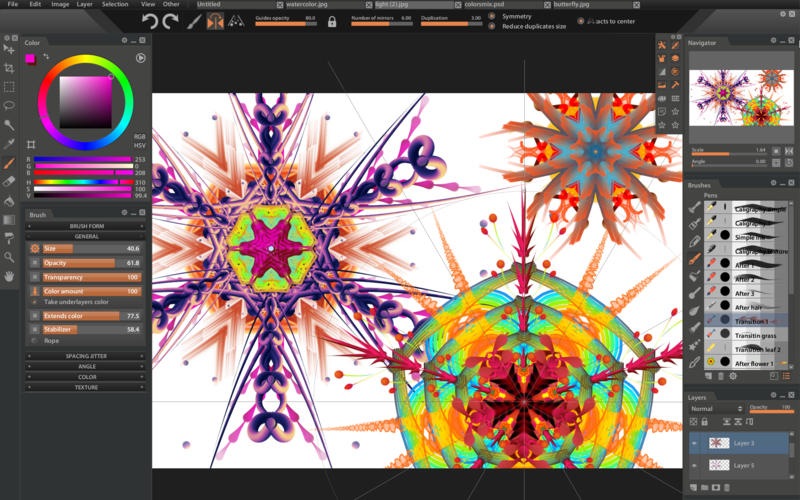
Paintstorm Studio for Mac 2.10 介绍Paintstorm Studio is created for professional digital painting. And a major role in this program play the brushes. We did our best so that you can easily and quickly adjust the brushes suitable for your painting style.
Anyone who has ever painted knows it's hard to overestimate the painting tool and the importance of all the seemingly insignificant details. We tried not to miss any of them. Our goal was to create an intuitive, simple-to-use but at the same time functionally powerful tool that brings the process of digital painting to a new level, making it as comfortable as possible.
Features
Full control of all brush options (Incredible possibilities for brush settings)
Bristle brushes of any form and kind
Stroke post correction (You can take an action on any option. Not only on the stroke thickness)
Full controlled mask-brush (Each brush can work as mask for other brush)
Takes underlayer's color while blending
"Close gaps" function when you fill or select
Individual hotkeys for any brushes
Fast layer selection
Smooth zoom and brush resize
Dirty brush mode
Stroke stabilizer
Usable color mixer
Different gradient strokes
Mirror drawing
Standart tools pack (Lasso, Magic wand, Crop, Fill, Gradient and etc)
Control of the random amounts
Photoshop PSD and ABR supported
Tablets supported
v2.10版本新功能Version 2.10:
New Refine Edge featured added for selection. Now you can expand, feather and smooth out the selected area.
Lasso tool improved. While selecting, hold down Alt to switch to Polygonal Lasso mode and back, hold down Backspace to change the last point or Enter to apply.
Stabilizer slider added for the lasso for more accurate selection. The edge of the selection became smoother.
Auto action option added for the lasso. It can be used to perform actions after the selection automatically: Fill, Gradient, Delete.
Color wheel can now be dragged to the Custom panels.
If you hold C (by default), the "Custom 1" panel will move to the mouse pointer and become a transparent background and when release, it will return back.
Brushes history added. Enable it in the Brushes panel settings
Rulers improved.
Ruler states can now be saved / loaded.
You can choose the color of the lines: gray, RGB or the custom color.
Holding ALT + R (by default) you can highlight all ruler states and quickly select the one you want.
For the 2-points and 3-points perspective a point is added that can be used to rotate the horizon.
An ability to disable the following rulers added
The parameters of the H, S, B brush have been slightly changed. Now the sliders can be moved in both directions for a more accurate distribution of random values
Place image feature added to Menu-> File to import the image to the current document. If you select several files, they will be imported as separate layers
You can now change the cursor type between Arrow, Point and Cross in Menu-> File-> Options-> Cursors. There you can choose the Brush Drag resize" tool mode as well
Finally! Tooltips added! You can also set the hotkeys with them
You can set the selected preset as a default in the New File panel. After the relaunch a new canvas will be created of the new defalut size
Little things:
A new Lines width slider added for guides, rulers, helpers, etc. to Menu-> File-> Options-> Main
Free transform is extending in both directions with holded ALT and rotating by 5 degrees with holded Shift
Gradient tool aligns the direction by 5 degrees with holded Shift
Hold Shift when moving the layer to move it strictly in vertical / horizontal direction
If you click the Brush tool while using Free transform tool, it is applied and you can start drawing immediately
Paintstorm Studio for Mac 2.10 下载 高速下载 客服微信coolgps QQ41360481




 请点击此处下载