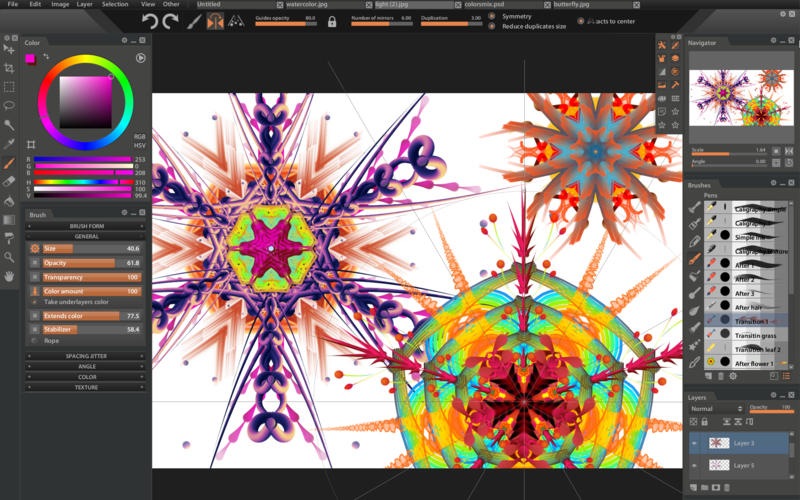
摘要:Mac平台上优秀的数字油画创建工具Paintstorm Studio推荐给大家,它支持画笔选项完全控制、自定义面板、支持PS图象处理软件PSD和ABR等功能,简单、方便、直观、专业的创建油画!!
Mac平台上优秀的数字油画创建工具Paintstorm Studio推荐给大家,它支持画笔选项完全控制、自定义面板、支持PS图象处理软件PSD和ABR等功能,简单、方便、直观、专业的创建油画!!
[Paintstorm Studio在Mac App Store上售价19美元]
Paintstorm Studio for Mac 2.30 介绍Paintstorm工作室是为专业的数字绘画创作的。这个程序中的一个主要角色是画笔。我们尽了最大的努力,使您可以轻松快速地调整画笔,适合您的绘画风格。
凡是画过画的人都知道,画的工具和所有看似无关紧要的细节的重要性是很难估计的。我们尽量不去想念他们中的任何一个。我们的目标是创造一种直观、简单易用,但同时功能强大的工具,将数字绘画的过程提升到一个新的高度,让它尽可能的舒适。
Features
所有画笔选项的完全控制(画笔设置的不可思议的可能性)
任何形式和种类的鬃毛刷子。
卒中后校正(你可以对任何选项采取行动)。不仅在行程厚度上)
参数绑定到透视图。
动态界面(全球界面规模、面板规模、透明度、颜色、表锁)
自定义面板
完全控制的刷头(每个笔刷都可以作为其他笔刷的掩模)
将下层的颜色混合在一起。
当您填写或选择时,“关闭空白”函数。
任何画笔的单个热键。
快速层选择
平滑缩放和画笔大小。
脏刷模式
中风稳定器
可用的颜色混合器
不同梯度中风
镜画
标准工具包(套索、魔棒、作物、填充、渐变等)
控制随机量。
Photoshop PSD和ABR支持。
平板电脑支持
v 2.30版本新功能Version 2.30:
这个更新致力于修复小错误,其中超过50个已经修复。
也在此版本:
"Blend transparency" parameter now works under the GPU and for the bristle brushes.
Korean language added. Special thanks to Lee Jun Hyek for translation!
The ability to turn the mask on / off added
"Antialiasing" button added to the lasso tools, magic wand and bucket
The ability to drag brushes into another category added
Now most of the working panels can be moved and scaled (Gradients panel, Textures panel, Image resize, define hotkeys, etc)
Two new parameters added to the "Transition" brush controller
"Transfer to down layer" function added (also works with the selection and several layers)
The ability to move selection added
The inverting of the layer added by "ctrl + i" (Menu-> Layer-> Invert)
The slider now moves slowly with holded "shift" and multiple with holded "ctrl"
New document orientation buttons added
"Copy from the visible layers" function added. Use shift + ctrl + c (Menu-> Edit-> Copy Merged"
Now you can enter the text with the keyboard (for example when renaming a layer) in any language (except for hieroglyphic symbols)
Hotkeys Import / export added
Paintstorm Studio for Mac 2.30 下载 高速下载 客服微信coolgps QQ41360481




 请点击此处下载