摘要:NeoFinder 7的第二次大的更新带来了许多改进和非常酷的新功能,如XMP预设编辑器,将使处理大型照片或视频集合更容易。NeoFinder for mac这款可随时随地记录您的文档,照片,歌曲,电影和文件夹,可快速编目和管理整个媒体和磁盘库以及备份存档的磁盘管理工具,类似于macOS的Finder!
NeoFinder 7的第二次大的更新带来了许多改进和非常酷的新功能,如XMP预设编辑器,将使处理大型照片或视频集合更容易。NeoFinder for mac这款可随时随地记录您的文档,照片,歌曲,电影和文件夹,可快速编目和管理整个媒体和磁盘库以及备份存档的磁盘管理工具,类似于macOS的Finder!
[NeoFinder 在官网售价39.99美元]NeoFinder Business 7.3 Mac 破解版 介绍NeoFinder(原名CDFinder)迅速组织你的数据,无论是在内部或外部磁盘,或任何其他卷。它对您的所有数据进行编目,这样您就可以控制数据归档或磁盘库。有了大量的元数据支持,您就可以快速找到文件了。
特征
NeoFinder now has a Display Filter that you can use to filter items based on their kind, name, rating, label, or other attributes! That is highly useful when working with large amounts of data, and works in all five view types!
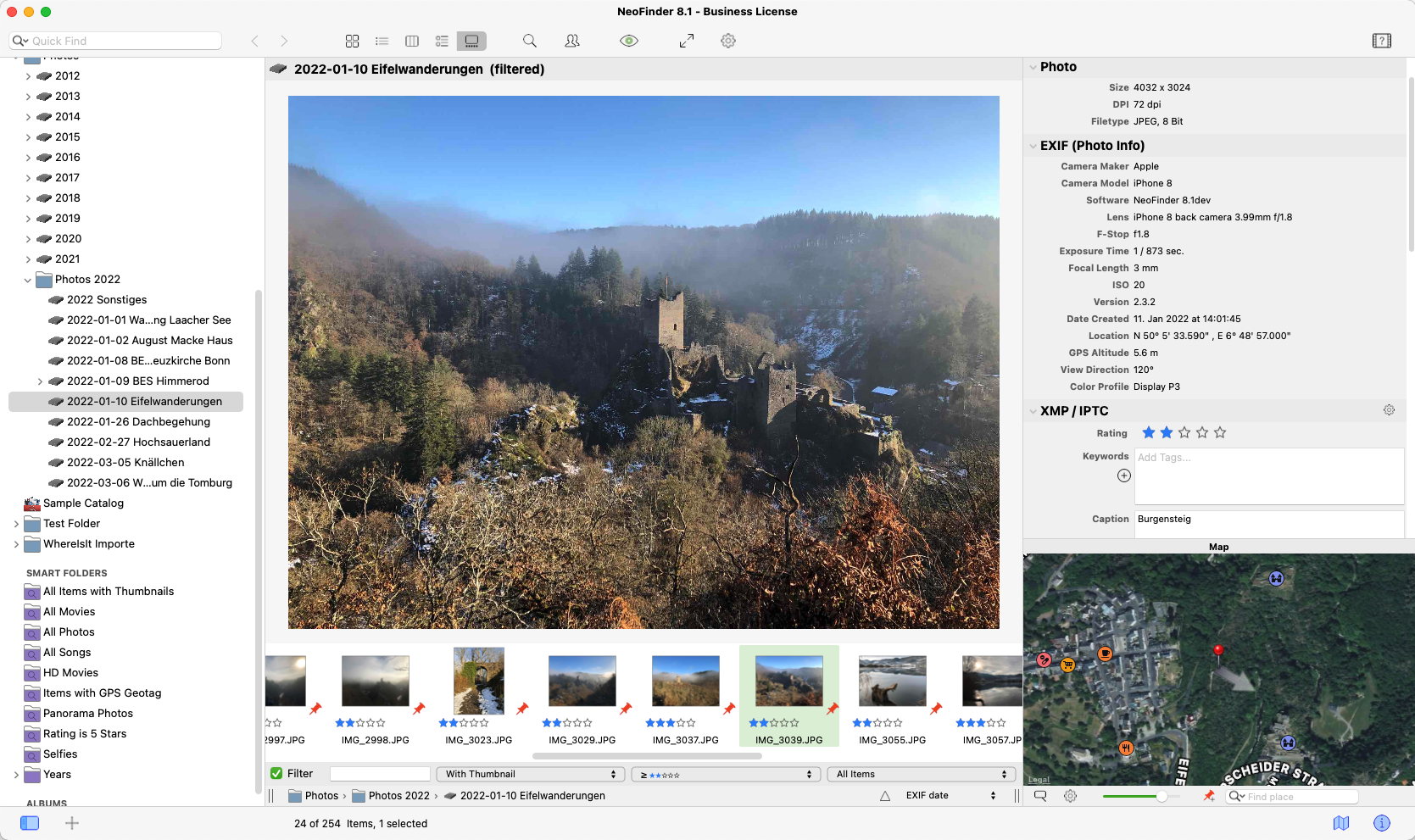
NeoFinder now has a cool Gallery View! Not just in macOS Mojavo, like Apples Finder, but in all Mac OS X and macOS versions since 10.7!
You can now update one or multiple media files in an existing catalog!
NeoFinder can now catalog the text from email messages! Currently, .emlx (Apple Mail) and .eml (MS Outlook) formats are supported
Many windows have a Help button that will open the suitable page in the NeoFinder Users Guide for you
Find Duplicates can now find Duplicate Folders!
In the Inspector, you can now Find Tags in Instagram by clicking on them
The Find Editor now autocompletes keywords for you, using the keyword list in the Controlled Vocabulary
You can copy and paste entire sets of XMP metadata from one file to another
NeoFinder catalogs Affinity Publisher documents, and of course allows you to edit the whole set of XMP metadata for these, too!
The XMP Editor in the Inspector now has a new Date editor, so you can change the XMP date for one or multiple items at once
The XMP Presets Editor now has a date field as well
NeoFinder can now of course catalog that XMP date field from existing files
A new Filefinder Text Importer allows you to import the text files from that abandoned old disk cataloger
You can now copy and paste GPS coordinates, and the XMP locations fields, separately
You can now sort the catalog LIBRARY by Volume Modification Date as well
The Movie Contact Sheet now has an option to turn off the time display in the thumbnails
Also, the Movie Contact Sheet can now automatically be saved next to the original file, even when multiple video files are selected. That is a great way of creating a lot of these at once
You can now duplicate Albums and Smart Folders, using the context menu
The file information that the Movie Contact Sheet displays is much more detailed and precise now
The Movie Contact Sheet now uses the modern AVFoundation in macOS for better results
The main window has a new button that will open the free NeoFinder Video Tutorials for you
NeoFinder can now catalog Aurora 2018 documents
NeoFinder can now catalog the BWF, or BEXT records from ProTools, with date and unique ID values for audio files
NeoFinder can now catalog thumbnails for Cinema 4D (".c4d") files, if that app is installed
NeoFinder can now catalog ICNS thumbnails
NeoFinder now catalogs thumbnails for stereoscopic MPO files
NeoFinder can now catalog the lens name of the EXIF record, and display it in the Inspector, and search it in the "any text" parameter or QuickFind
NeoFinder now catalogs the fps value of movies as floating point, allowing for values like 29.97
Find Duplicates can now search for duplicate audio files by the BEXT record
A new button can now display and reverse the sort order in the navigation bar of NeoFinder
The Photo Contact sheet can now include a second line with details from each photo
You can now download an entire folder with all files and subfolders from the Backblaze B2 and a Dropbox catalog!
The LIBRARY sidebar now uses a more modern "view based" control from Apple. It will look better, and interactions are better with this
You can now open an Album in a separate window, too
Ejecting volumes now runs in the background, and won't block NeoFinder anymore
You can now double click one or multiple keywords in the Controlled Vocabulary list to add these to the one selected file
You can now remove files and folders from the Found Items list, to generate better reports
The number of items of albums is now displayed in green
Exporting a file using the Item menu will now also copy a possible sidecar XMP file to the target location
The Web Gallery now adds the media info to its Details page
The Web Gallery uses a lot less memory while generating the HTML pages for you
The folder list in the Batch Cataloging window is now always hierarchically sorted by name, even if your NeoFinder database is placed on a APFS volume
Date changes in the Auto Updater will now be used for all selected catalogs, not just one of them
Updated the code to read the Audio CD cover art from Coverartarchive.org



 请点击此处下载