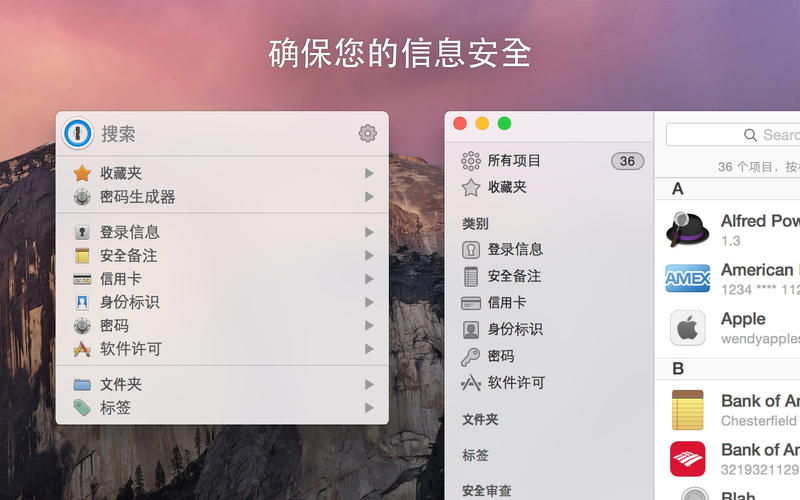
1Password mini is here with an all new design focused on making it as easy as possible to get your information out of 1Password and into the places where you need it
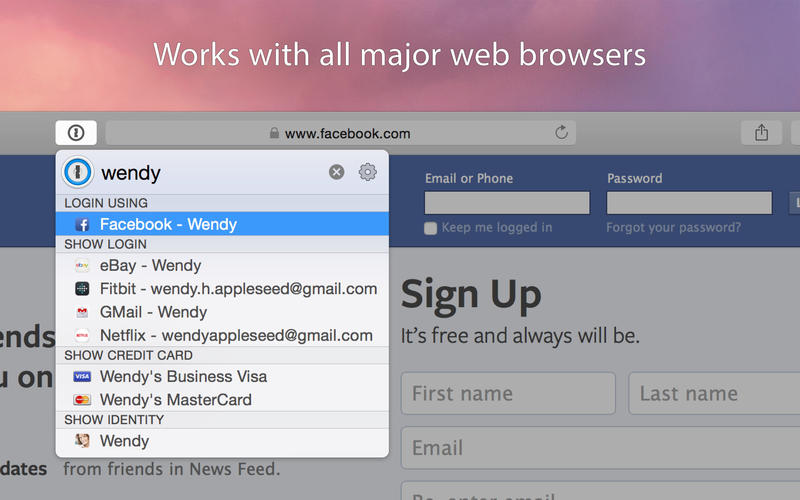
1Password mini now displays suggestions based on the contents of the web page you're viewing
Updated to the latest and greatest filling brain
Introduced the ability to select all vaults belonging to a single account
You can now drag and drop two-factor authentication codes from the item detail
The 1Password menu now has an "Unlock with Touch ID" option if Touch ID is available
The onepassword:// URL Scheme now supports viewing and editing items. You can also specify the vault UUID for these commands
Improvements:
Items can now be bulk restored from the trash via the context menu
Open and Fill now works if 1Password is set to "Open in Current Tab" and Safari 12.1 is set to "Empty Page" for new windows and tabs
Improved performance when setting up from iCloud or Dropbox
The document preview in 1Password mini now allows you to drag and drop files from the preview
The troubleshooting utility can now be opened from the help menu if installed
"Check For Updates" can now be disabled by Mobile Device Management profiles
You can now open the 1Password Preferences window from the 1Password mini gear button or by right clicking on the menubar icon
When scanning a new two-factor authentication QR code, 1Password now puts the generated code on the clipboard for you to paste into the site requesting it
?+N can be used in 1Password mini to enter New Password mode
?+S can be used in 1Password mini to manually save a Login from the current webpage
Improved the sign-in process when your Secret Key has changed
When using the keyboard shortcut to show 1Password mini, it is now anchored to the menu bar by default
You can open the Categories menu in 1Password mini using the ?+?? shortcut
Updated the descriptions of Watchtower used throughout 1Password
1Password mini now displays when a browser extension isn't connected
The Watchtower two-factor authentication banner now allows you to indicate you've set up two-factor authentication elsewhere
1Password mini to will now Quick Fill a login item even when there are password items with the same URL
Improved the display of Document details in 1Password mini
It's now even easier to enable Watchtower two-factor authentication checking
Issue that could prevent the "Add 1Password Account" window from dismissing
Updated our translations with the latest from our incredible translators on Crowdin
Improved the speed of search
Updated the Updater app icon
Improved the detection of reused passwords
1Password mini can now suggest passwords for Feedly, Dynalist, Mailplane, Pocket, and Slite when they are the frontmost apps
When prompted to re-authenticate your 1Password account you can now scan your new Emergency Kit to populate the secret key and email address fields
The Edit menu now consistently calls out "Move Item to Trash" instead of "Delete"
1Password will now ensure that only one copy of itself is running at any one time
Improved the handling of filling your information into web pages via the keyboard command
Touch ID message in clamshell mode has been improved
The Delete Vault command in the vault contextual menu is now separated from less dangerous commands
Added link CSV format instructions to the import window
Improved unlock speed when Touch ID is configured
1Password now warns you when it detects another copy running on your system
You can now search for tags inside 1Password mini
1Password mini will be shown when attempting to quick fill into a page with no recognizable fields
1Password mini will always open to the last place you had it when opening with it ?+Option+
Added the ability to drag and drop notes fields in 1Password mini
Fixed:
Passwords could be copied from the password generator without being automatically saved
Issue that would cause the main window to open when attempting to open and fill from an external app
VoiceOver images in the Preferences > Accounts tab now read the account name for the account image
Changing the vault of an item in a detached window
Converting a Password item to a Login item in a detached window
Opening related items in a detached window
Resolved a case where the Safari extension would fail to establish its connection to 1Password
Bug that could cause 1Password to hang momentarily at start-up
The error messages shown when encountering a problem with the 1Password database are now more helpful
Dark mode is now properly supported in the "Reset All 1Password Data" window
Issue that would prevent onepassword://search from working if triggered while locked
Invalid cache files were not being removed
Changing the type of a new field could discard the field label
Loading a malformed item
Issue that prevented the "items with attachments" search from working while in all vaults
Issue that could prevent the contents of All Vaults from loading immediately after setup
1Password would not quit when the last window was closed in some instances
Closed detached windows could reappear when activating 1Password mini
Issue that prevented items from receiving "last modified" updates when removing a Tag using the sidebar
The 1Password window now responds correctly to double-clicking in the title bar area
Issue that would cause a failure to generate a two-factor authentication code if the secret or URL had invalid characters in it
Corrected a problem where clicking on the 1Password mini icon in the menu bar would sometimes do nothing while Chrome or Firefox was active
When using ?+Shift+C to Copy a Password from 1Password mini it will now close the window after copying
Issue where 3rd Party App Integration could fail to open an item if a URL SHA wasn't included
Watchtower now assumes credit cards expire at the end of the expiry month
Words and phrases could not be selectively copied from notes fields
1Password mini that prevented Markdown rendering in notes fields
The Private vault's name and description can no longer be changed
Fixed some cases where localized text wouldn't render correctly in Advanced Preferences
Issue that could cause the top of a markdown-formatted note field to be clipped
Items shown in detached windows now update if changed in the background
Issue where ?+ would not fill if the URL was not an exact match
Issue that prevented ?+O from pinning the currently visible item in 1Password mini
Issue that reloaded an item in 1Password mini when using keyboard shortcuts to scroll on macOS 10.12
Browser Preferences now display their correct values when you open the Preferences window
Graphical glitch when drawing the pop-out date picker in the item detail view
Corrected some logic that could cause updates to fail
Potential slowdown issue after unlock
Regression in the Browser preferences layout when the language is set to German
"Detect Duplicate Items" would not find duplicates
Issue that allowed length of vault names longer than the 25 characters limit
Issue with corporate firewalls terminating the 1Password.com notifier connection due to lack of communication
Issue that caused passwords to be generated twice each time a slider gem was clicked
VoiceOver now reports the item count when reading each category or tag
Rare issue that caused 1Password to prompt twice to save an edited item
Fixed the formatting of numeric passwords
Possible issue with slowdowns when viewing an items details
Issue where the menu showing items with duplicate passwords could be incorrect
Issue where a vault could be created with an empty Master Password
Fixed issue causing documents not to upload if still uploading during the version 6 to 7 upgrade
Resolved an issue that could cause certain settings to not be saved after doing a Reset all 1Password Data
Rare crash that could occur when selecting a vault image
Rare crash that could occur when editing the website fields on an item
Crash that could happen when downloading a document that was incorrectly uploaded without a name
Crash that could occur when failing to decrypt an item
Issue where a crash could occur during search
Crash that 1Password.com users might see when syncing
Crash that could occur if Google Chrome was in the middle of an update and a connection to 1Password was attempted
Issue that could cause a crash in certain new setup scenarios
Rare crash that occurred when rapidly scrolling past items with notes
Crash that could occur when adding your account using the Preferences window
Adding a 1Password account via the Accounts Found window no longer causes a crash on macOS 10.12
Crash that could occur if an attachment icon was invalid
Security:
Item could be duplicated without permission
Issue that allowed drag and drop when it shouldn’t
Issue where in some cases travel mode would leave items in memory until next lock
1Password will no longer restore clipboard contents after the expiration of a copied two-factor authentication code if the previous clipboard contents contain secure strings (e.g. previously copied passwords)
Version 7.2.6:New:
Added support for ■■■■■■■■■■■ for those with 1Password accounts. (Apologies for the redaction, we'll clean this up when we launch this feature on 1Password.com)
Security:
Reduced memory usage and enhanced security for those using older versions of macOS by ensuring all items are freed when 1Password locks
Version 7.2.5:Improvements
Improved unlock speed when Touch ID is configured.
Improved unlock time in some cases on slower computers. {apple-issues#2929}
Improved the speed that 1Password will lock. {apple-issues#2857}
Added support for QuickBooks. Your QuickBooks logins will show up in 1Password mini when QuickBooks is the frontmost app. {apple-issues#3148}
Improved the display of type information for Documents. {apple-issues#2887}
VoiceOver users can now interact with the button to show the vault list view.
VoiceOver users can now interact with the more button when interacting with a vault in the vault list view.
The headers in the vault list view and category list view are now VoiceOver accessible.
The "Open URLs" setting is now available in the Browsers tab of the 1Password Preferences window. {apple-issues#2646}
Better wording for the "Open URLs" preference. {apple-issues#2915}
Updated our translations with the latest from our incredible translators on Crowdin.
Opening a URL in Safari while configured for Open in Current tab will now open a new tab if the available Safari tab is open to an empty page. {apple-issues#2884}
Updated the logo used for credit cards. {apple-issues#2948}
The Delete Vault command in the vault contextual menu is now separated from less dangerous commands. {apple-issues#3070}
Added a link to the CSV format instructions on the import window. {apple-issues#1964}
1Password now warns you when it detects another copy running on your system.
Fixed
1Password will no longer falsely tell you that it is not enabled in Safari when fast user switching. {apple-issues#2901}
Fixed the formatting of numeric passwords. {apple-issues#3078, apple-issues#3079}
Fixed a possible issue with slowdowns when viewing item details. {apple-issues#3034}
Fixed an issue where the Chrome and Firefox extension wouldn't work after a 1Password update until they were relaunched. {apple-issues#2908}
Fixed an issue where the menu showing items with duplicate passwords could be incorrect. {apple-issues#2738}
Fixed an issue where a vault could be created with an empty Master Password. {apple-issues#3019}
Fixed an issue where documents that were being uploaded during the upgrade from version 6 to version 7 would not be uploaded once the upgrade was complete. {apple-issues#3006}
Resolved an issue that could cause certain settings to not be saved after doing a Reset all 1Password Data.
Holding down the return key on the lock screen no longer causes the window to shake its way completely off screen. {apple-issues#2446}
Importing from 1Password 6 now defaults the file chooser to the correct location. {apple-issues#1715}
Fixed a bug that could make it difficult to add 1Password accounts from certain domains to the app. {apple-issues#2971}
Fixed a bug that could prevent the full 1Password account sign-in address from being displayed. {apple-issue#976}
Fixed a layout issue in the sidebar. {apple-issues#2772}
Item icons in the detail view now update immediately if changed on another device, instead of requiring re-selection. {apple-issues#2894}
Fixed an issue where editing an item in a detached window also made changes to the item displayed in the main/mini windows. {apple-issues#2768}
Fixed several right-to-left language rendering issues. {apple-issues#2585, apple-issues#2540}
One-time password codes and numbers like phone, CV code, credit card numbers, should maintain left-to-right layout in right-to-left languages. {apple-issues#2636}
Fixed an issue that prevented printing an invoice from the billing window. {apple-issues#1837}
Fixed an issue that caused changing field types to sometimes fail while editing an item. {apple-issues#2769}
Fixed an issue that caused the warning shown when deleting a vault to be hard to read in dark mode. {apple-issues#2639}
Fixed an issue that caused the Saved Form Details key icon to be cut off. {apple-issues#2833}
Fixed a crash exporting to CSV or TXT files. {apple-issues#2634}
Fixed instances where the 1Password window would unnecessarily deminiaturize from the dock when activating 1Password. {apple-issues#2588}
Removed the redundant "Remove Redundant" contextual menu that could appear. {apple-issues#1218}
Fixed a behavior that would cause users to not to be prompted to save a login if there was a copy of that particular set of credentials in the trash. {apple-issues#2651}
Fixed an issue that prevented renaming tags. {apple-issues#2708}
Fixed an issue that prevented titles from being copied. {apple-issues#2744}
Fixed an issue where the Firefox and Chrome extensions would not come back up after restart or an upgrade. {apple-issues#2832}
Fixed an issue where an incorrect icon for dark mode or light mode was used in the Code Scanner window.
Version 7.2.4:New
1Password will now find your 1Password.com emergency kit in your Downloads folder, making it even easier to get started for the first time.
You can now use [Continuity Camera] (https://support.apple.com/en-us/HT209037) to scan 1Password Setup Codes and two-factor QR codes on macOS Mojave. {apple-issues#2262}
Improvements
Improved the speed and capabilities of keyboard navigation through lists in 1Password mini. {apple-issues#1508}
Reduced the CPU usage when performing Watchtower database updates.
Navigating the item list in 1Password using VoiceOver is now better than ever.
The item detail section of 1Password provides better accessibility for VoiceOver users.
You will now be asked to save unsaved changes before creating a new item. {apple-issues#2548}
Many improvements have been made when using 1Password in right-to-left languages.
Detached windows are now sent behind the main window while locked. {apple-issues#2515}
Improved the experience of entering a password when importing AgileKeychain files by adding the ability to cancel the operation. {apple-issues#1573}
Improved load times for those with a large number of vaults and items.
Added an informative alert when dismissing a two-factor prompt without completing account login. {apple-issues#2495}
You can now add custom fields to the first section of items. {apple-issues#2601}
Updated our website filling capabilities which should greatly improve filling on many sites.
The 1Password Updater will no longer run while a macOS user account is not active (either at the Login Window or signed into a different account via Fast User Switching). {apple-issues#2754}
The 1Password Updater now validates the code signature of 1Password after installing it into the Applications folder. This is in addition to code signature checks it has done on the downloaded updates all along.
Fixed
Fixed an issue where the last line of rich text would have its border cut off. {apple-issues#2490}
Fixed a rare crash when the screensaver locks.
Can now control-click vaults in the sidebar. {apple-issues#486}
Fixed a crash that would occur if the font used for Markdown was removed. {apple-issues#2524}
Fixed an issue where 1Password would not unhide when Command-Tabbing it to the front. {apple-issues#2348}
Fixed the error message shown when a document could not be copied to another server. {apple-issues#1306}
Fixed a crash when trying to save app preferences while 1Password was locked. {apple-issues#2322}
The loss of a network connection no longer causes future MFA authentication failures.
Fixed a crash when encountering an invalid item type. {apple-issues#2488}
Added a missing period in the autocomplete suggestion of the 1Password.com account sign-in address field. {apple-issues#2404R}
Fixed an issue where items could sometimes not be duplicated. {apple-issues#2591}
The vault import window now supports Dark Mode. {apple-issues#2547}
Fixed a crash when locking during Watchtower updates. {apple-issues#2270}
Fixed a crash that could occur when attempting to open and fill. {apple-issues#2595}
Fixed an issue where the menu bar icon could reappear if activated from browser.
Fixed a crash that could occur during vulnerable password checking. {apple-issues#2609}
Fixed a crash that could occur when loading items. {apple-issues#2657}
Fixed an issue where an item would disappear until next unlock after removing its attachment. {apple-issues#1934}
Fixed an issue that could cause 1Password accounts to fail to automatically sync changes made on other devices. {apple-issues#2647}
Fixed a crash that could occur when deleting a vault. {apple-issues#2627}
Fixed an issue where opening a Document item in a separate window could cause Quick Look to break. {apple-issues#2582}
Fixed an issue where multiple import windows could be opened. {apple-issues#2660}
Fixed an issue that caused extra characters to be inserted into a tag when editing. {apple-issues#2589}
Fixed a bug that could leave a non-functioning Add Account popup when signing into multiple accounts in your web browser. {apple-issues#2620}
Fixed the display of dates (Dec 31, 1969 and Jan 1, 1970) imported from older legacy versions of 1Password. {apple-issues#2517}
Fixed an issue where right-clicking on a tag in the sidebar did not show the Delete command. {apple-issues#2047}
Fixed an issue where the Display In Browser setting was being ignored. {apple-issues#1323}
Security
Fixed a rare issue where locking would freeze during bulk document download. {apple-issues#2751}
1Password now requires Certificate Transparency from 1Password.com/1Password.eu/1Password.ca. {apple-issues#715}
Version 7.2.2:New
1Password now requires you type your Master Password any time you add or remove fingerprints. {apple-issues#690}
Improvements
1Password will now prompt you to enable the Safari App Extension if it is not enabled when Safari becomes active.
The item detail section provides better accessibility for VoiceOver users.
Detection of reused passwords in Watchtower has been improved. {apple-issues#2031}
Added an option to disable Markdown in Secure Notes. You can find this setting in Preferences > General. {apple-issues#460}
Improved 1Password mini's ability to display properly when multiple screens are present. {apple-issues#2101, apple-issues#1515}
Favorites can now be sorted by the usual methods (Date Created, Date Modified, etc). {apple-issues#1499}
Improved unlock speed for users who have a large number of vaults.
The image icon in a vulnerability alert is now skipped by VoiceOver since the text explains the details.
Several small improvements for Dark Mode. {apple-issues#2335, apple-issues#2337, apple-issues#2325}
Touch ID now remains available when you enable or disable standalone vaults. {apple-issues#690}
Search Options can now search based on the presence of a 2FA code. {apple-issues#1816}
Hitting the Return key in an empty Master Password field will now prompt for Touch ID if it is available. {apple-issues#1864}
Command-Shift-C will now always copy an item’s password. This restores behavior that existed prior to the 1Password 7 update. {apple-issues#1429}
Improved the wording on the alert that appears when converting an Agile Keychain to OPVault.
OmniFocus 3 has been added to the list of applications for which 1Password mini will show suggested items. (Shout out to our friends in Seattle, congrats on the release!)
Fixed
Repaired non-functional Terms of Service and Privacy Policy links during account signup. {apple-issues#2413}
Fixed an issue that prevented emojis from being found when searching the trash. {apple-issues#2328}
Corrected the VoiceOver text available in empty categories, making access faster and more fluid than before.
Fixed an issue that could cause 1Password to slow down over time. {apple-issues#2365}
Fixed a layout issue that resulted in the Browser preferences being laid out incorrectly. {apple-issues#2016}
Fixed an issue where search terms would be ignored when searching using the onepassword://extension/search/ URL. {apple-issues#2417}
Fixed an issue that caused 1Password to come to the foreground when copying items from an anchored window. {apple-issues#2348}
Fixed an issue that prevented the Copy button from working in Preferences > Accounts. {apple-issues#2336}
Fixed a crash when 1Password locks while idle.
Fixed a rare crash when filling items into web pages.
Fixed a crash that could occur in the Autosave window when locked. {apple-issues#2349}
Fixed an issue that could cause 1Password mini to stick around when it should have been dismissed
Fixed an issue that would result in the Touch ID settings being hidden if you were in a state that required you to supply your Master Password to reauthorize Touch ID.
Fixed issue where if the app was hidden, opening 1Password mini would also open the main window. {apple-issues#1157}
Fixed a rare issue that would cause vault edits to fail. {apple-issues#2272}
Fixed an issue where items with removed custom templates would not be displayed. {apple-issues#1377}
You can (finally) search through your notes using the Command-F keyboard shortcut again.
Fixed a crash when locking during Watchtower updates. {apple-issues#2270}
Repaired a UI glitch on the "Done" button of the account chooser window. {apple-issues#2309}
Fixed an issue where Safari 11 users would receive a deluge of alerts telling them to upgrade to Safari 12.
The lock keyboard shortcut now updates when the preference changes. {apple-issues#2249}
Fixed a bug where search options for password strength gave numbers instead of words.
Fixed an issue where a two-factor authentication prompt might not be shown when 1Password is locked. {apple-issues#2271}
Fixed a crash when item titles begin with multi-character sequences such as emoji. {apple-issues#2230}
Fixed a crash when icon information is missing. {apple-issues#2225}
Security
Resolved an issue that allowed minimized item detail windows to appear unlocked when the application was locked. {apple-issues#2475}
Downloaded document files are no longer decrypted until viewed in the 1Password user interface. {apple-issues#2419}
1Password no longer shows the vault selector in the Touch Bar while locked. {apple-issues#2285}
1Password 7.3.1 Mac 破解版 下载 高速下载 客服微信coolgps QQ41360481




 请点击此处下载