摘要:Final Cut Pro 是Mac OS平台上最好的视频剪辑软件,Final Cut Pro为原生64位软件,基于Cocoa编写,支持多路多核心处理器,支持GPU加速,支持后台渲染
Final Cut Pro 是Mac OS平台上最好的视频剪辑软件,Final Cut Pro为原生64位软件,基于Cocoa编写,支持多路多核心处理器,支持GPU加速,支持后台渲染,可编辑从标清到4K的各种分辨率视频,ColorSync管理的色彩流水线则可保证全片色彩的一致性。
[Final Cut Pro在Mac App Store上售价人民币1998元]
Final Cut Pro for Mac 10.3 介绍经过完整而彻底的重新设计后,Final Cut Pro 为后期制作工作流程的方方面面增添了无与伦比的速度、质量和灵活性。
创新的视频编辑
在“磁性时间线”中编排片段,完全避免片段冲突或同步问题
使用“片段连接”功能将 B-roll、声音效果和音乐添加到时间线
通过将片段分组到复合片段来减少混乱。
使用“内联精确度编辑器”在时间线中保持完美步调
通过“试演”功能在时间线中的一个位置循环显示不同镜头、图形或效果
通过自动同步编辑多机位项目,支持多达 64 个机位角度
强大的媒体整理
在资源库中整理您的作业,以有效地进行媒体管理和协作
按原样处理众多格式,包括 RED、AVCHD、来自 DSLR 的 H.264 等等
“内容自动分析”采集摄像机元数据并在后台分析镜头
随着您在片段中选择范围的过程创建并应用自定关键词
“智能收藏”可让您动态整理内容,只需几次点按即可查找任何镜头
非凡的性能
Final Cut Pro 充分使用了 Mac 中的 GPU,从而实现了无可比拟的实时回放性能和快速后台渲染功能
64 位架构充分使用了系统中内存,可处理更大的项目以及更丰富的效果
后台处理可让您实现无间断工作
外部监视允许您通过 HDMI 或 Thunderbolt 和 PCIe 设备来传送视频和音频
引人注目的可自定效果
应用效果前可进行预览,以查看它们是否适合您的素材
使用直观的控制来更改字幕、转场和效果的外观
使用直接显示在时间线中的关键帧编辑器精确控制效果
使用带有自定界面并支持双 GPU 的第三方 FxPlug 插件
集成的音频编辑
直接在时间线中展开和编辑多通道音频文件
让 Final Cut Pro 来帮您修正严重的音频问题,如嗡嗡声、过多噪音等等
只需一步即可将 DSLR 视频与单个音频同步,并即刻实现音频波形匹配
直观的色彩分级
通过一键点按“平衡颜色”功能,改善任何片段的外观
应用“匹配颜色”功能,使两种不同条件下的片段镜头的外观匹配
使用“颜色板”处理颜色、饱和度和曝光
使用抠像和遮罩可对特定颜色范围或屏幕的特定区域进行颜色微调
一步优化输出
交付用于在 Apple 设备和诸如 Vimeo、YouTube 和 Facebook 网站上回放的项目
使用主题菜单快速添加制作者信息以及刻录 DVD 或 Blu-ray 光盘
使用“角色”元数据导出自定的音频主干和多个版本的已完成视频
导入和导出 XML 以支持第三方工作流程
Final Cut Pro 官方手册 http://help.apple.com/finalcutpro/mac/10.0.6/?lang=zh-cn
v10.3版本新功能Version 10.3:
Note: Now requires OS X 10.11.4 or later
New Interface
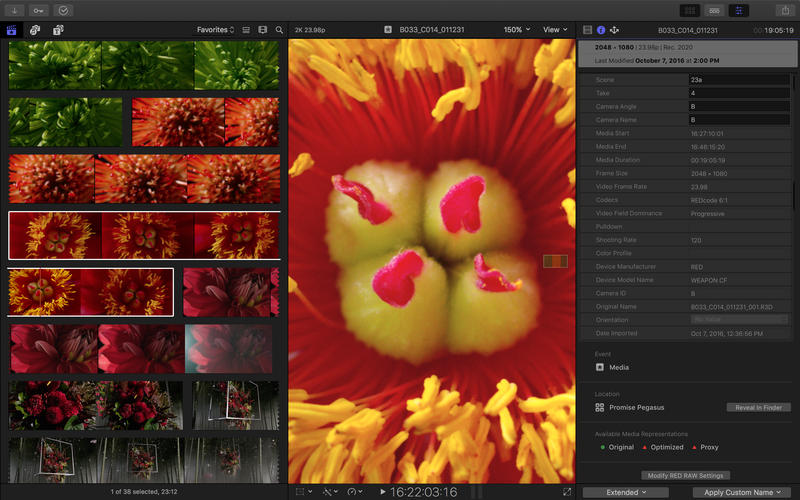
Redesigned dark interface puts the focus on your video
Configure window layouts into custom workspaces for tasks like organizing and color grading
Fill a second display with the timeline or hide the timeline completely
Expand the Inspector to full-screen height
Magnetic Timeline 2
Color coding of clips based on roles - such as dialogue, music, and effects - lets you understand your project at a glance
Create, assign, and customize the colors of roles to identify different types of audio and video clips
Enhanced Timeline Index lets you drag and drop audio roles to rearrange the layout of your timeline
Focus button in the Timeline Index lets you highlight specific audio roles and collapse all others
Show Audio Lanes button in the Timeline Index displays a structured timeline layout with dedicated spaces for each audio role
Add audio effects and keyframe audio volume changes to an entire role within a Compound Clip
iXML support enables automatic creation and assignment of roles based on metadata from an audio field recorder
Create and manage a unique set of roles for each Final Cut Pro library
Wide Color
Images are now viewable in wide color on supported Mac computers and external displays
Import, edit, and deliver video in standard Rec. 601 and Rec. 709 color spaces, or in wide Rec. 2020 color space
Configure color spaces for both libraries and projects
Log footage from ARRI, Blackmagic Design, Canon, Panasonic, and Sony cameras, as well as RED RAW footage, can be manipulated in real time while preserving wider color
Range check overlay in the viewer highlights areas out of the standard RGB range
Video scopes display wide color in real time
Support for the Touch Bar on MacBook Pro
Tap to execute common functions like volume control, fade in and out, and media import
Easily access advanced editing commands, including Override Clip Connections, Trim to Start, and Trim to End
View your entire project at a glance and navigate with touch in the timeline overview
More Video Formats
MXF-wrapped Apple ProRes provides a flexible new format for broadcast delivery




 请点击此处下载